Alight Motion iOS – Complete Guide for iPhone and iPad Users
Video editing has become a daily activity for content creators, students, influencers, and businesses. Whether you are creating social media reels, YouTube shorts, or professional animations, having a powerful editing app on your phone can make the process easier. Alight Motion iOS is one of the most popular mobile editing applications that allows users to create high-quality animations, motion graphics, visual effects, and professional videos directly from their iPhones and iPads.
Unlike many basic editing apps, Alight Motion provides advanced tools that are usually available only in desktop software. Users can add keyframe animations, visual effects, transitions, layers, text animations, and much more. This guide explains everything about Alight Motion for iOS, including its features, installation process, benefits, system requirements, and useful editing tips.
What is Alight Motion iOS?
Alight Motion for iOS is the Apple version of the popular Alight Motion video editing and animation application. It is designed specifically for iPhone and iPad users who want advanced editing features without using a computer.
The application combines video editing and motion graphics tools in one platform. Users can create animated content, edit videos, add effects, insert text, and customize projects with complete creative control. Because of its simple interface and powerful capabilities, the app is suitable for both beginners and experienced editors.
Why is Alight Motion Popular on iOS?
Many iPhone users prefer Alight Motion because it offers professional tools while maintaining an easy-to-use design.
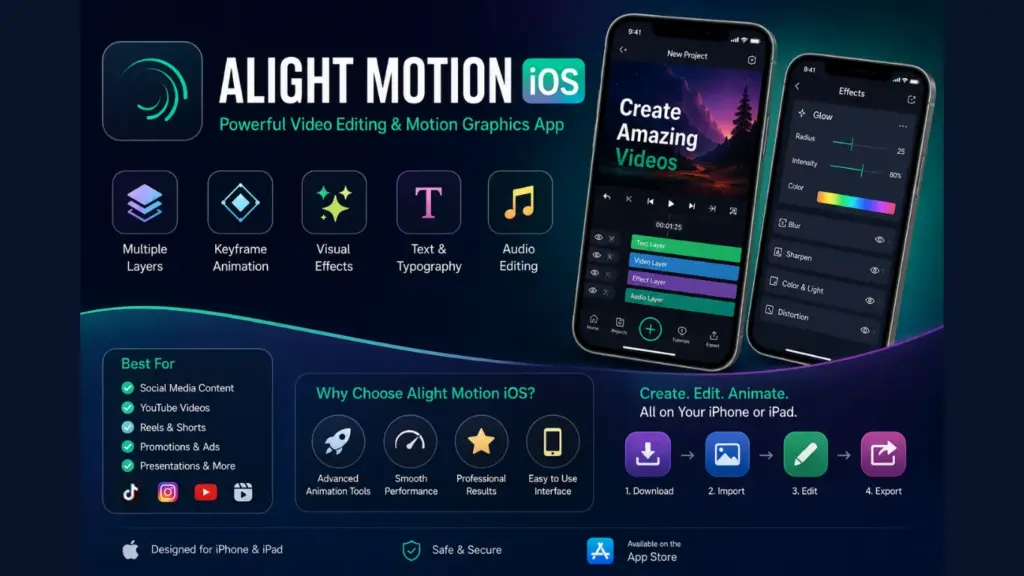
Key Features of Alight Motion iOS
Professional Motion Graphics
One of the biggest strengths of Alight Motion is its motion graphics system. Users can animate text, images, and objects using keyframes.
Keyframe Animation
Keyframe animation allows users to control movement and transitions with precision.
Multiple Layers Support
Alight Motion supports multiple editing layers, making complex projects easier to manage.
Visual Effects Library
The app includes a large collection of visual effects that can enhance video quality.
Text and Typography Tools
Text plays an important role in social media content. Alight Motion offers various typography tools that allow users to create stylish titles and captions.
Color Adjustment Tools
Color grading is essential for professional video editing. Alight Motion provides options for:
Audio Editing Features
The app also includes useful audio editing tools.
System Requirements for Alight Motion iOS
Before installing the application, users should ensure their device meets the necessary requirements.
How to Download Alight Motion on iOS
Downloading Alight Motion apk on an iPhone is a simple process.
Follow these steps:
Step 1: Open the App Store
Launch the App Store on your iPhone or iPad.
Step 2: Search for Alight Motion
Type “Alight Motion” into the search bar and locate the official application.
Step 3: Tap Install
Press the install button and wait for the download to complete.
Step 4: Open the App
Once installed, open the application and complete the setup process.
Step 5: Start Editing
Create a new project and begin editing your videos using the available tools.
How to Create Your First Project
After installation, creating a project is straightforward.
Choose Project Settings
Import Media
Add Effects
Apply effects and transitions to improve visual quality.
Export the Project
When editing is complete, export your video in the desired quality settings.
Benefits of Using Alight Motion iOS
Best Uses of Alight Motion App iOS
Alight Motion can be used for many creative purposes.
Tips for Better Editing in Alight Motion
Alight Motion iOS vs Other Editing Apps
Compared to many mobile editors, Alight Motion offers a stronger focus on animation and motion graphics.
Is Alight Motion iOS Worth Using?
For users who want more than simple trimming and transitions, Alight Motion is definitely worth considering. It provides professional-level editing features while remaining accessible to beginners.
Whether you are creating content for social media, YouTube, school projects, or business marketing, the app offers enough tools to produce impressive results directly from your iPhone or iPad. If you prefer a previous release for compatibility or familiar features, you can also explore the Alight Motion Old Version that best suits your editing needs.
Conclusion
Alight Motion iOS is a powerful video editing and animation application that brings professional tools to mobile devices. With features like keyframe animation, multiple layers, visual effects, text customization, and audio editing, users can create high-quality content without needing desktop software.
The application is suitable for beginners who are learning video editing as well as experienced creators looking for advanced motion graphics tools. Its combination of simplicity and powerful functionality makes it one of the best video editing options available for iPhone and iPad users. By understanding its features and following best editing practices, users can create engaging videos that stand out on social media and other digital platforms.